Culinary e-commerce site built in WordPress
Introduction
Overview
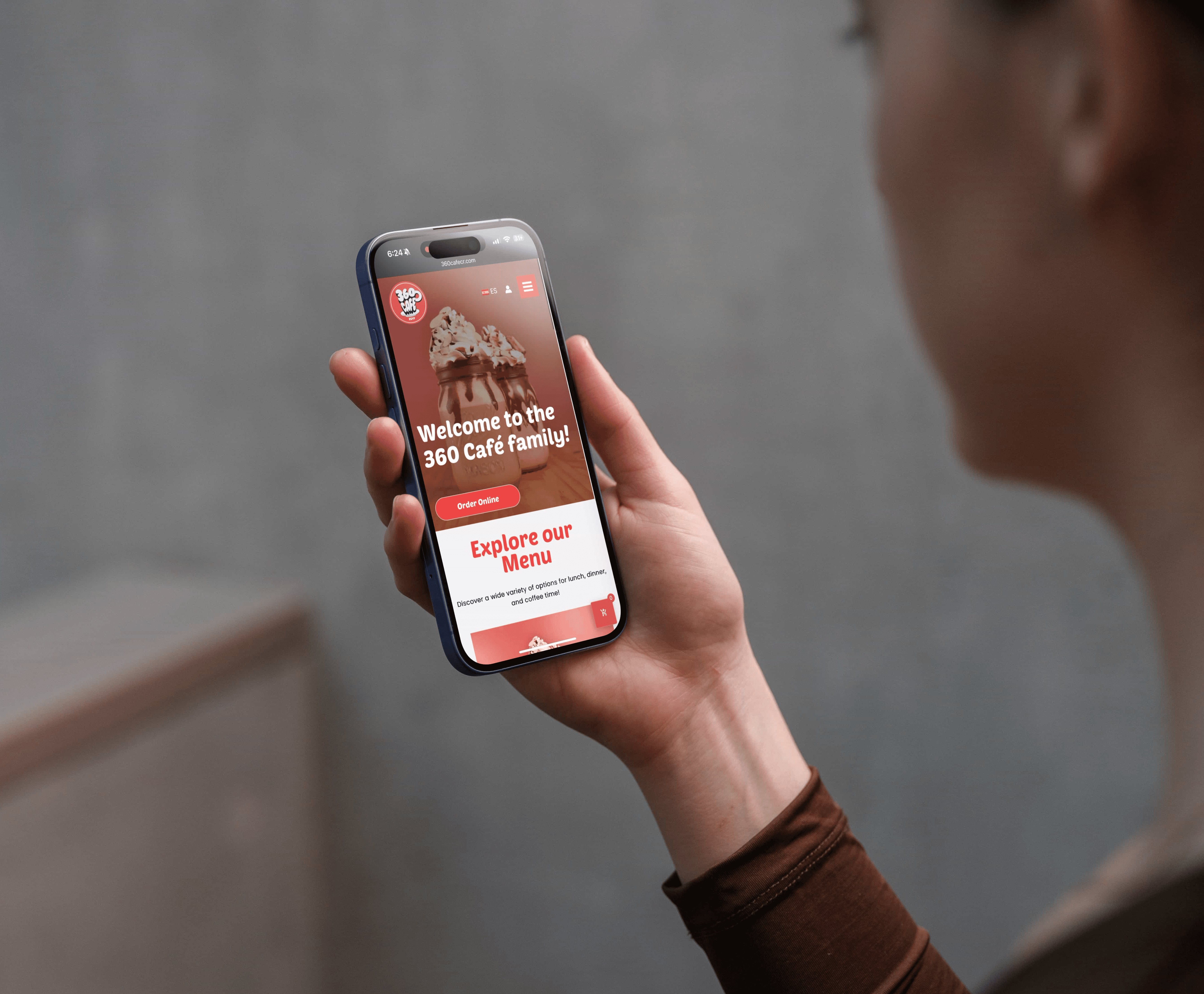
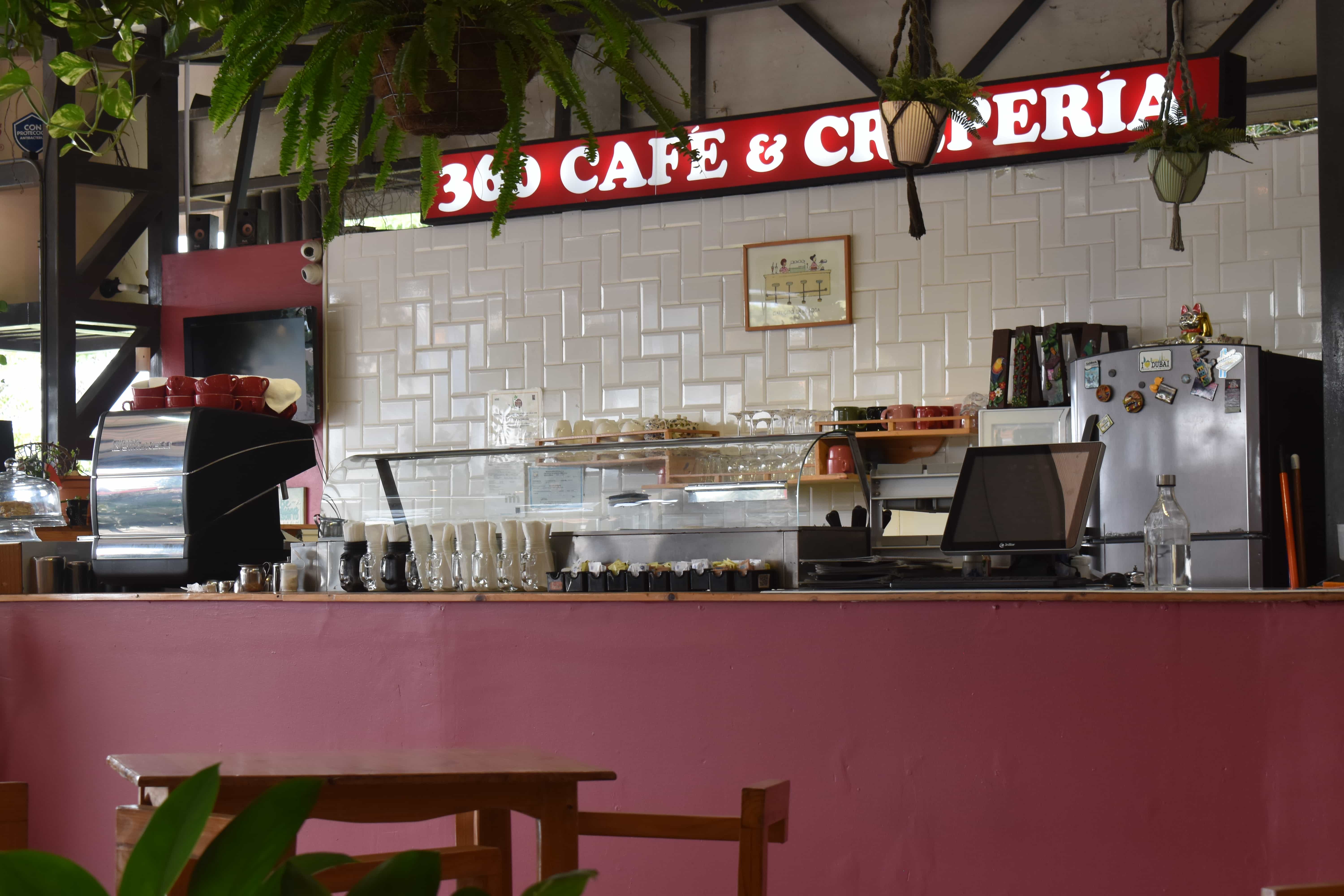
“360 Café” is a well-known local restaurant in the heart of Costa Rica, serving authentic food to both residents and tourists. Its digital presence was limited to social media platforms and lacked an independent website.
Objectives
Design a sleek, responsive website for 360 Café with online ordering, reservations, and easy menu management. It aims to boost engagement, streamline service, and enhance visibility.
Outcome
The project developed an intuitive and attractive responsive website designed to fulfill the needs of both local and international customers. This was optimized for device responsiveness and search engine visibility.
This project is a real client project for 360 Café, a local restaurant in Costa Rica. I thoroughly developed the entire website end-to-end.
Approach
I adopted a user-centered design approach to research, design, and develop 360 Café website. This strategy involved the following phases:
Phase 1: Research
Phase 2: Design
Phase 3: Validate & Iterate
Phase 4: Build & Launch
Please refer to the final report at the end of this case study for more details.

Research
Background Research
Problem Statement
Personas
User Journeys and Flows

Design
Information Architecture
Wireframes (Ideation)
Content Strategy
High-fidelity Prototype

Validate & Iterate
Usability Testing
Insights
Refinement

Build & Launch
Website Development
Search Engine Optimization
Performance Optimization
Website Handoff

Understanding the landscape
During this phase, I analyzed the café’s current digital presence and identified gaps in how users access information and interact with the brand online. By identifying key behaviors and pain points, I defined a focused problem and uncovered opportunities.
Methodology
Conduct background research.
Devise a problem statement.
Develop personas.
Outline user journeys and flows.
Background Research
Stakeholder Interviews
I conducted structured interviews with 360 Café's owners and management. These interviews defined the business context, clarified priorities, and highlighted gaps between business communications and customer needs. Three main objectives emerged:
Increase visibility among international tourists.
Streamline the reservation and to-go ordering process for local customers.
Establish a professional digital presence that accurately reflects the quality of the in-person experience.
Interviews showed staff managed customer inquiries across scattered social media channels, wasting time, causing inconsistencies, and lacking a reliable central source.
Desk Research
Secondary research examined the competitive landscape, dining habits, and e-commerce food service. The research revealed that only two restaurants near 360 Café had websites, while the other competitors only had a social media presence.
In Costa Rica's online world, there are deficiencies in English content and online ordering services, presenting an opportunity for 360 Café to stand out through digital strength.
Problem Statement
360 Café lacks a functional, user-centered website, making it difficult for potential customers to access essential information, place online orders, or make reservations. International tourists cannot access an English menu, and local customers cannot make reservations.
Without addressing these gaps, the café risks losing visibility and revenues.
Personas
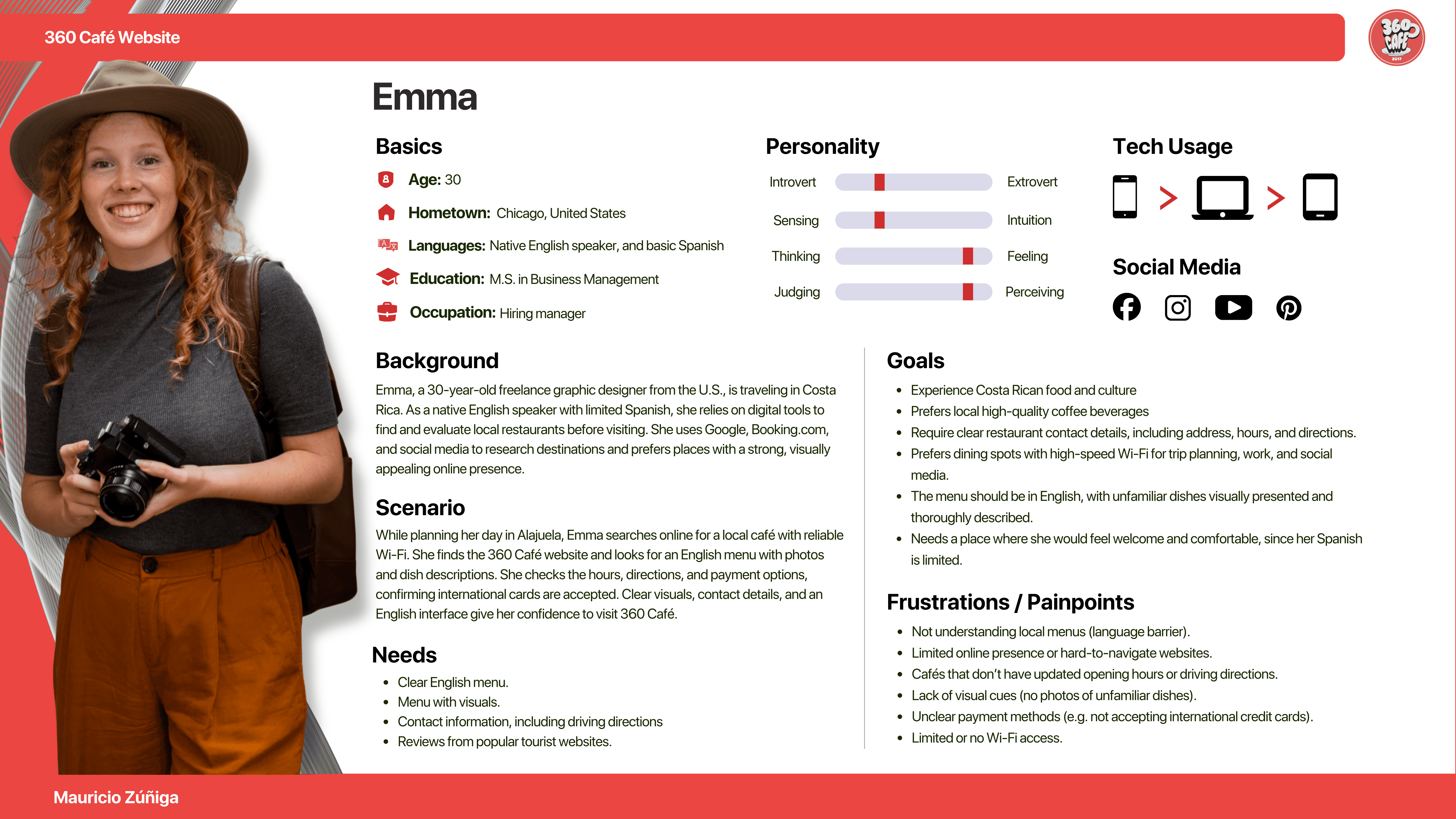
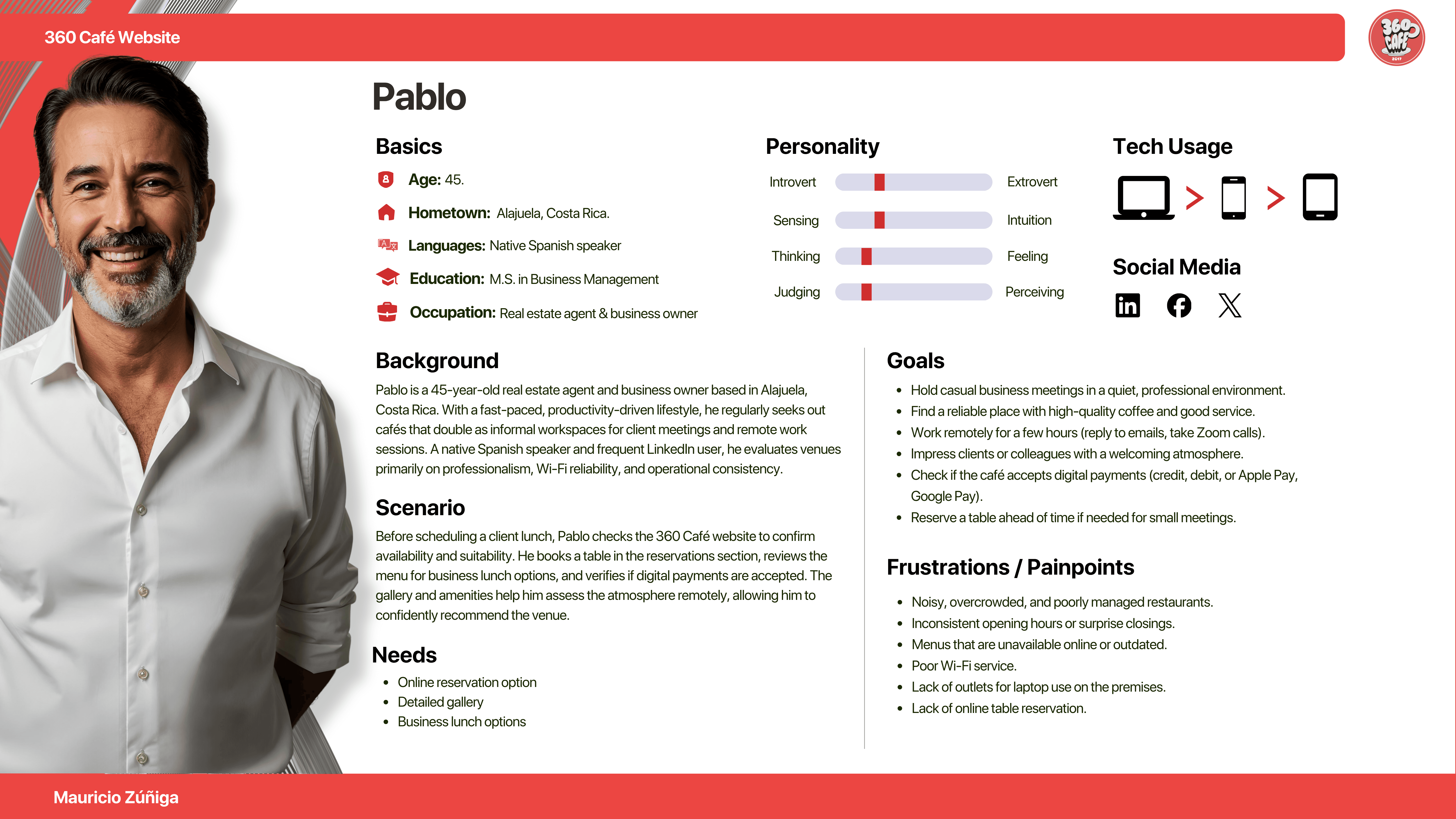
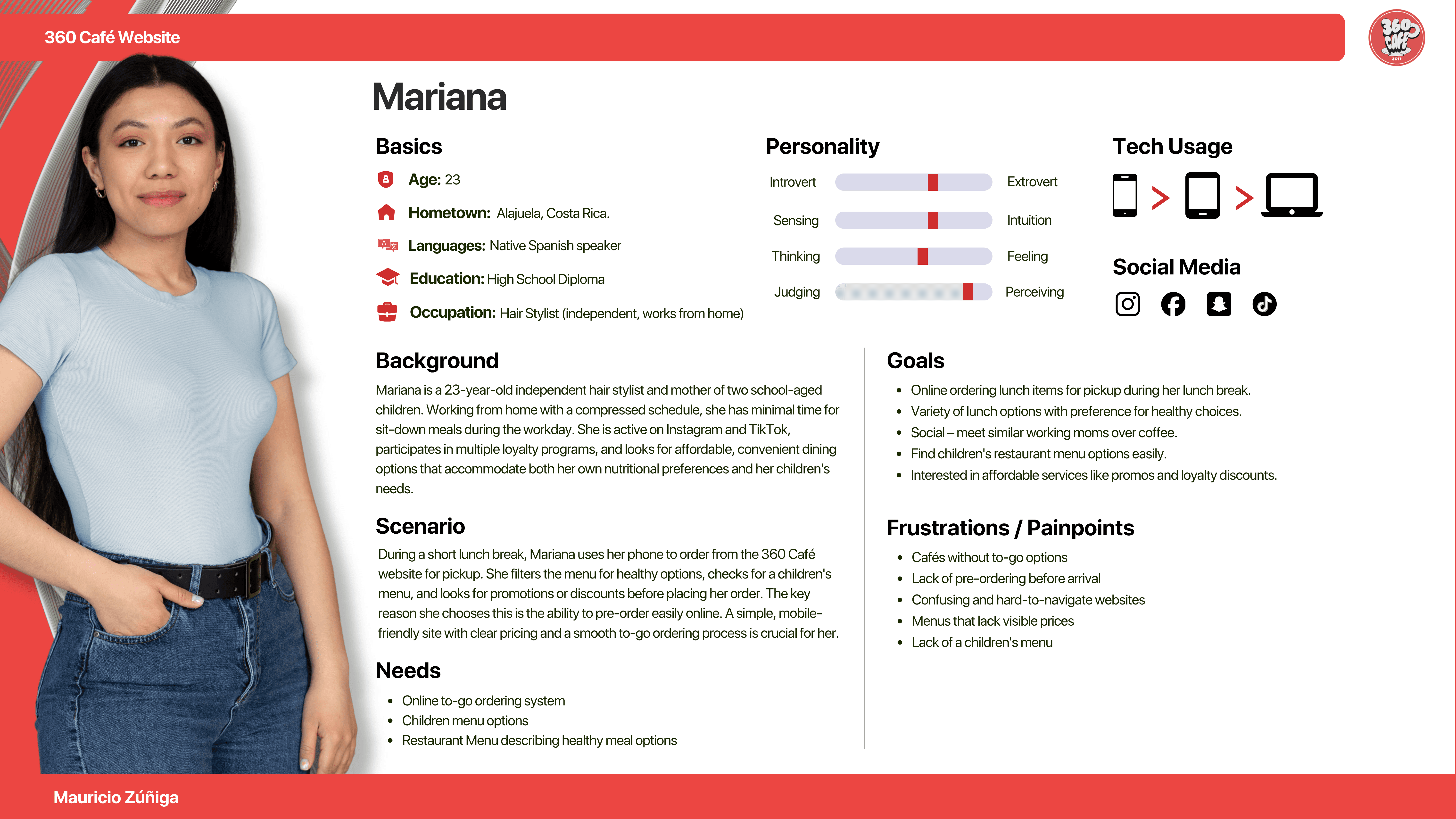
Three personas were developed based on interviews and observed behaviors of 360 café customers. This method enhanced my understanding of the user perspective when addressing the problem.
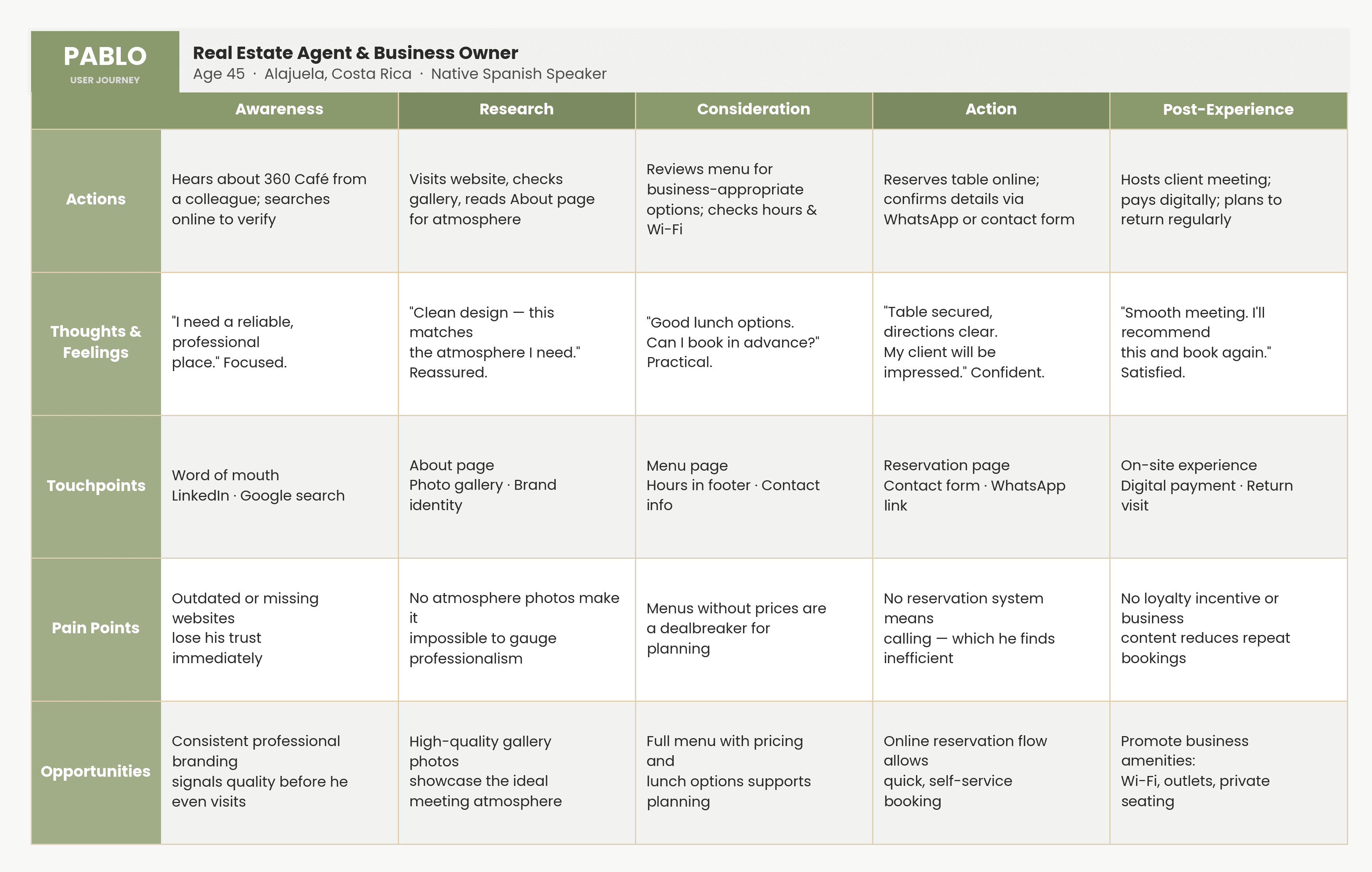
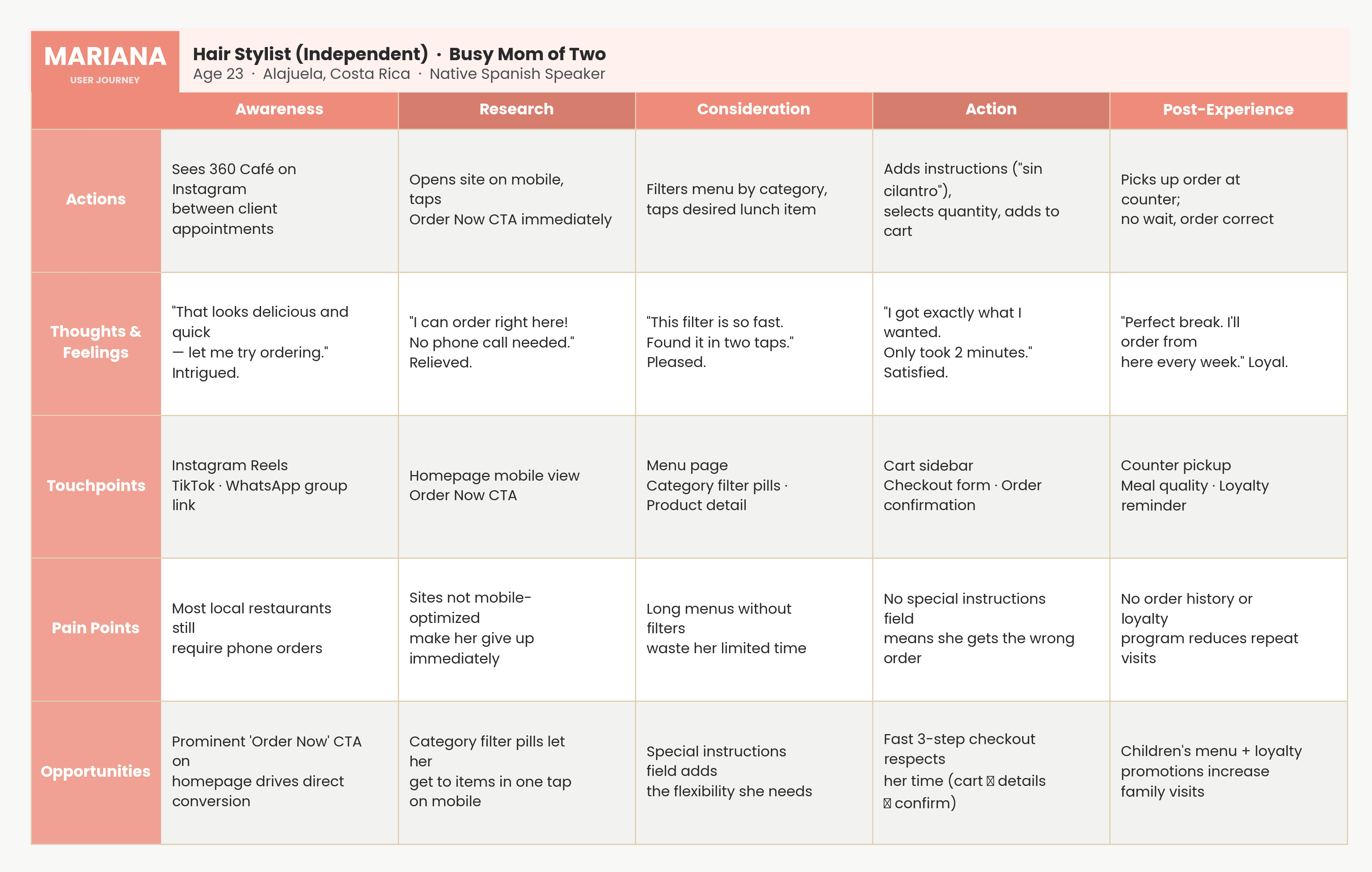
User journeys
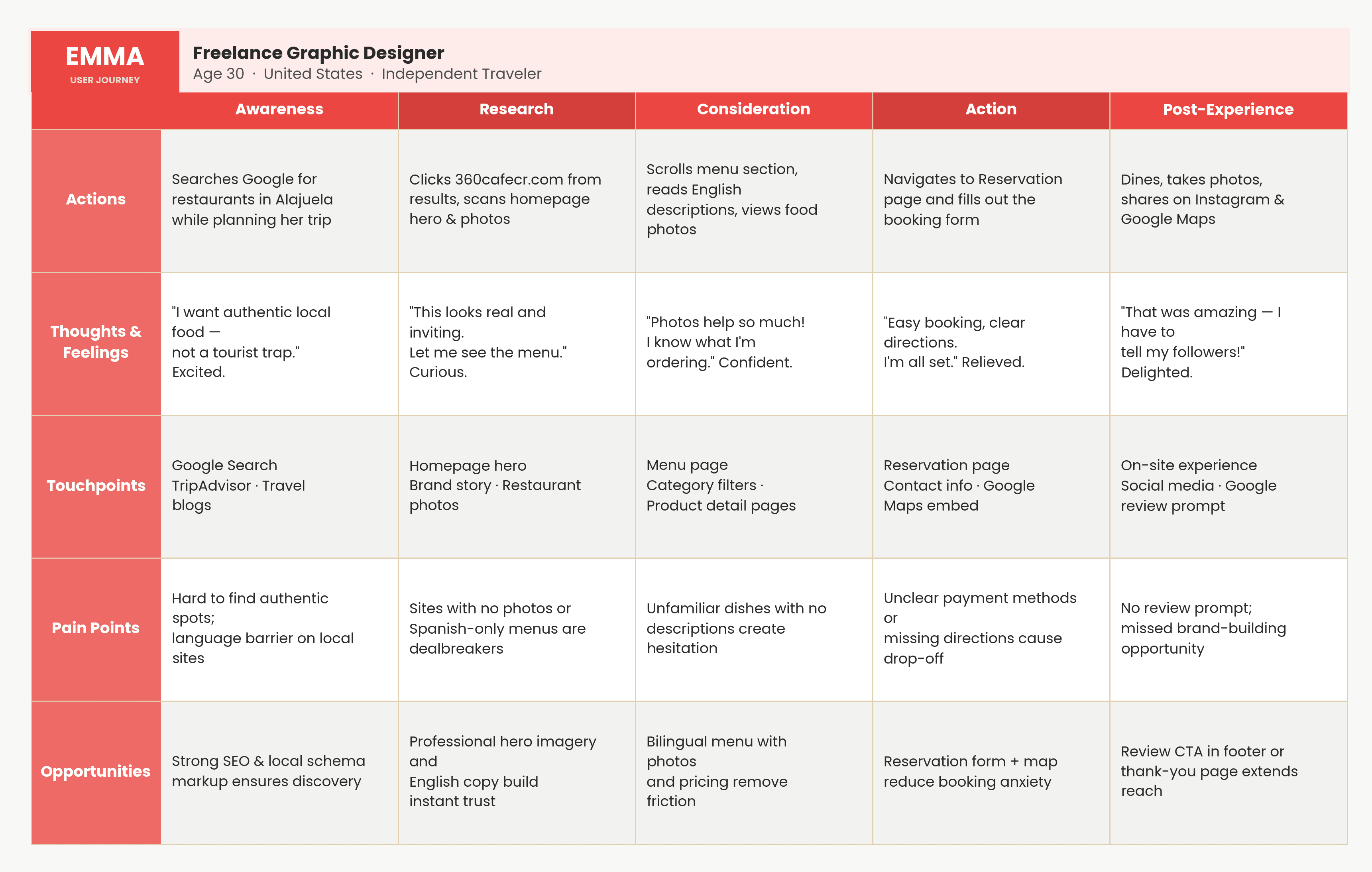
Journey maps were created for each persona, covering five stages: Awareness, Research, Consideration, Action, and Post-Experience.
Each map detailed actions, thoughts, feelings, touchpoints, pain points, and strategic opportunities. They provide a comprehensive analysis of where friction was greatest and where design may have the most impact.
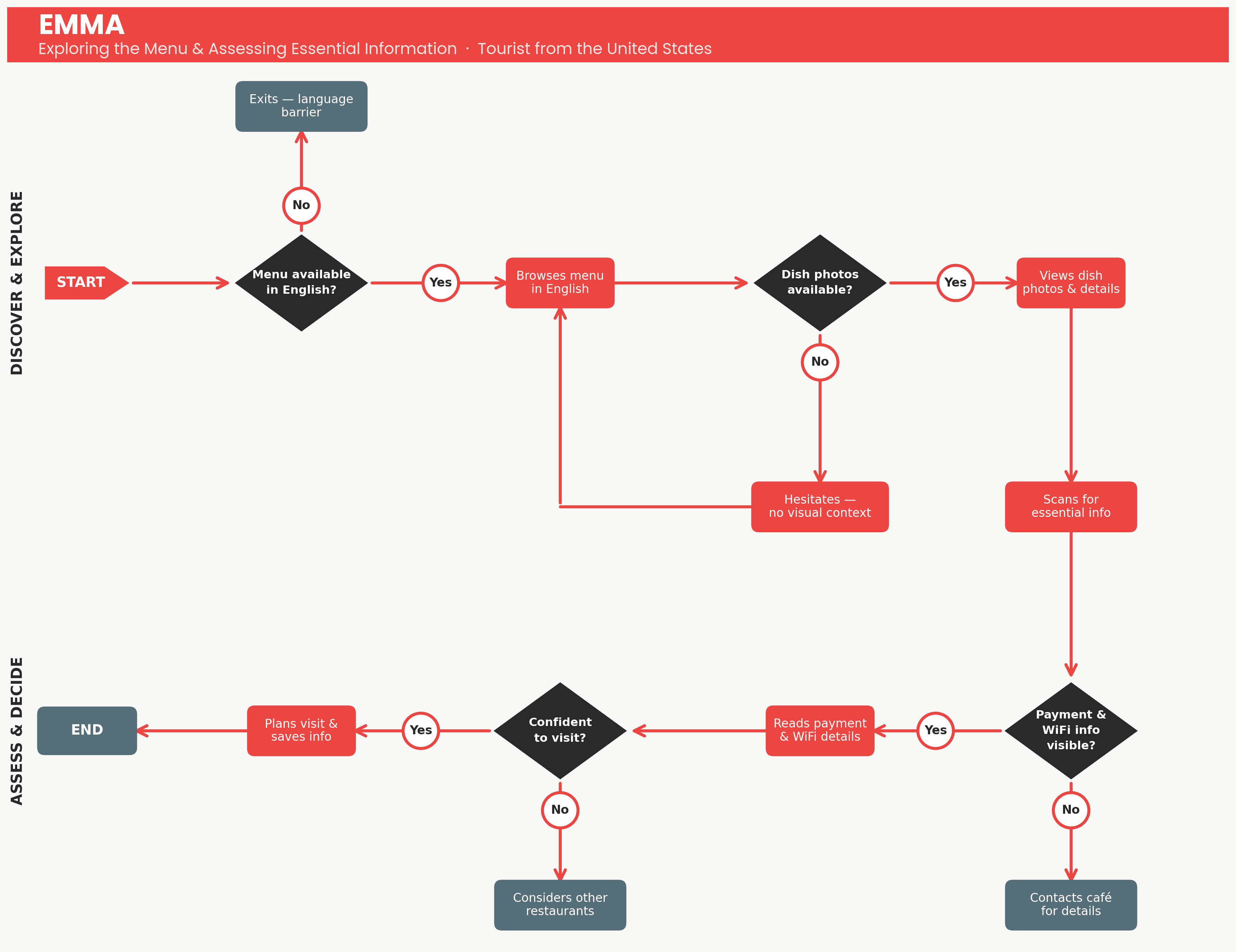
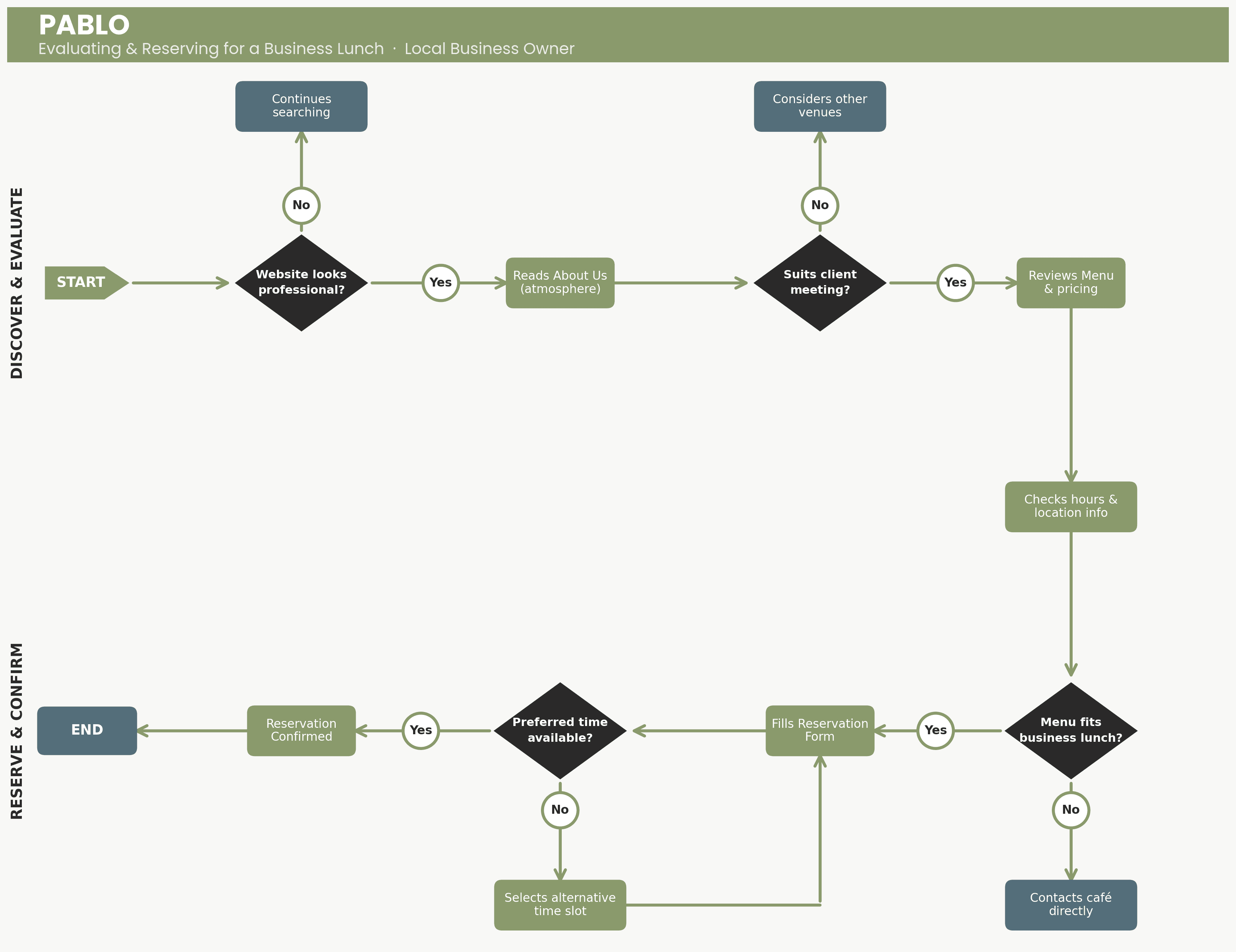
User Flows
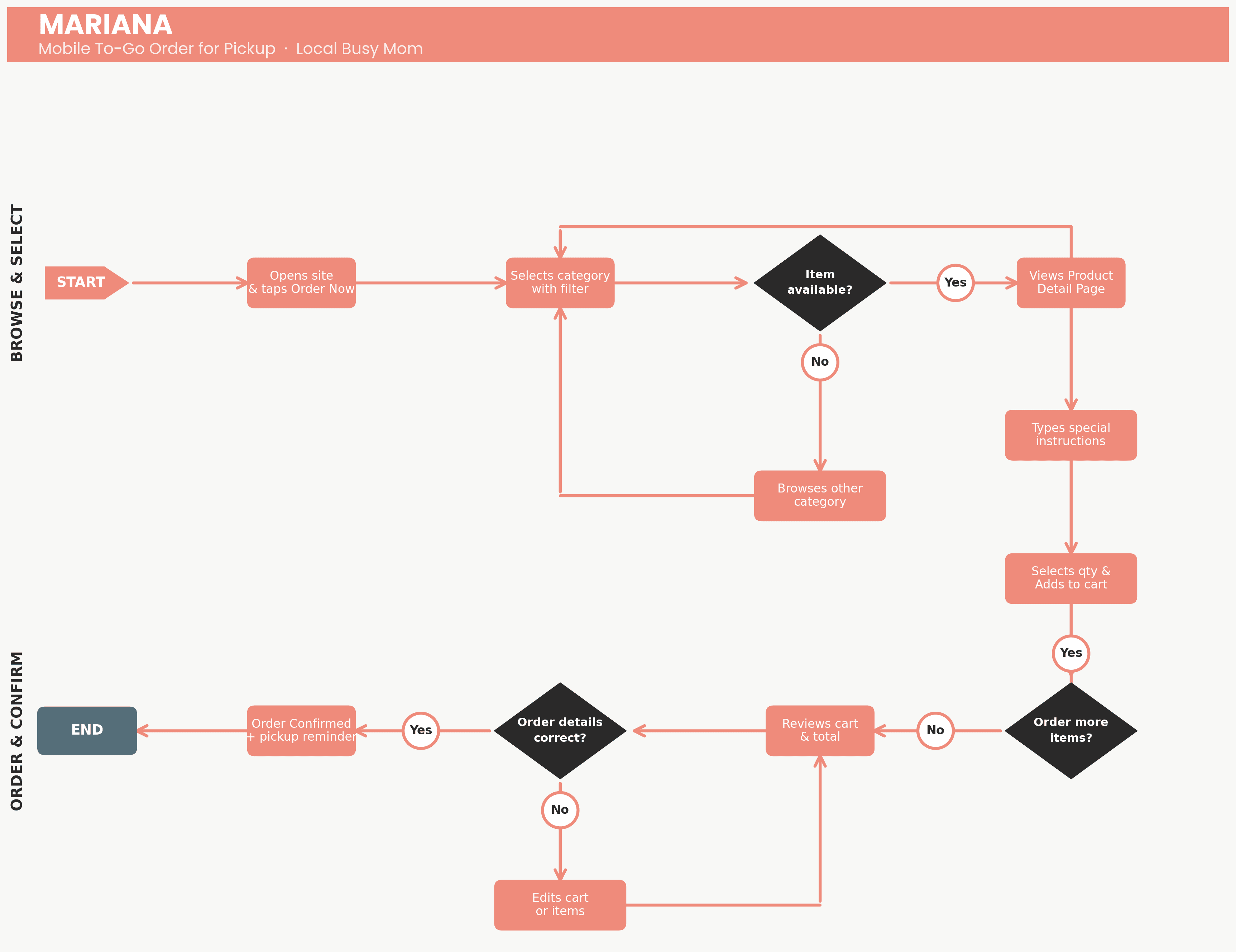
User flows translated journeys into step-by-step sequences for key tasks: landing on the homepage, finding translate menus, making a reservation, building a to-go order, or finding hours and directions in under a minute.
A pattern emerged across all three personas: despite different entry points and goals, all needed clarity, speed, and confidence. These needs guided every design decision in the next phase.

Phase 2: Design
Ideating and designing the potential solution
In this stage, I consolidated research findings to draw actionable conclusions. The aim was to create a potential solution to test with real users before developing the final product.
Methodology
Proposed the information architecture for the website
Ideate through initial low-fidelity wireframes
Defined the website content strategy
Create a high-fidelity prototype
Website Information Architecture (IA)
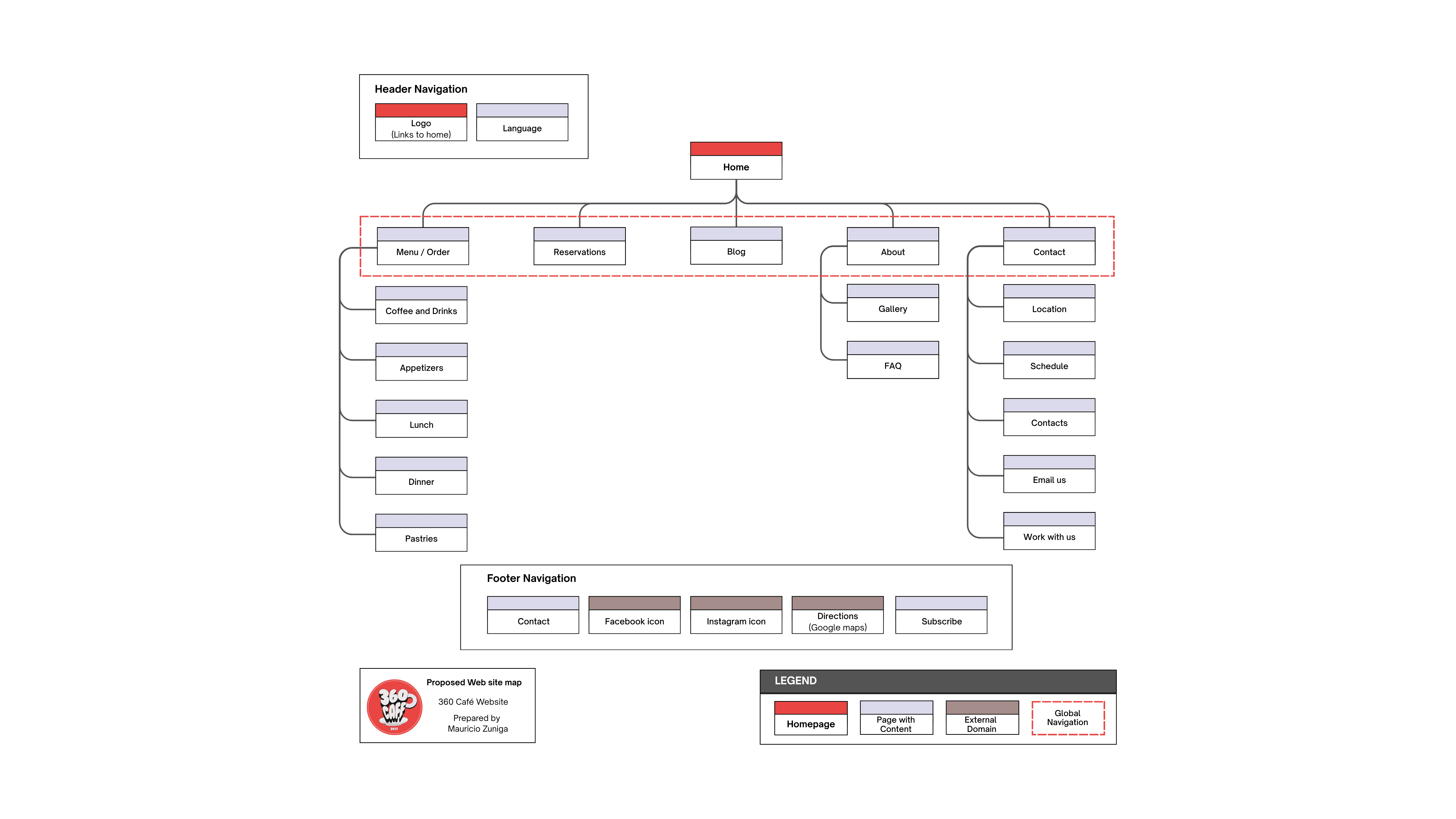
The information architecture was developed to align with each persona's goals, ensuring all main tasks are easily accessible with fewer interactions. It also matches the mental model of a typical culinary business website.
The navigation addressed the main user and business needs:
Contact us → Essential contact information.
About → Story, Gallery photos, FAQ, Reviews
Reservations → Make online reservations.
Menu → Place online orders and view menu details (price, dish photo, ingredients).
Language feature → Switches content between English and Spanish.
Low- Fidelity Wireframes
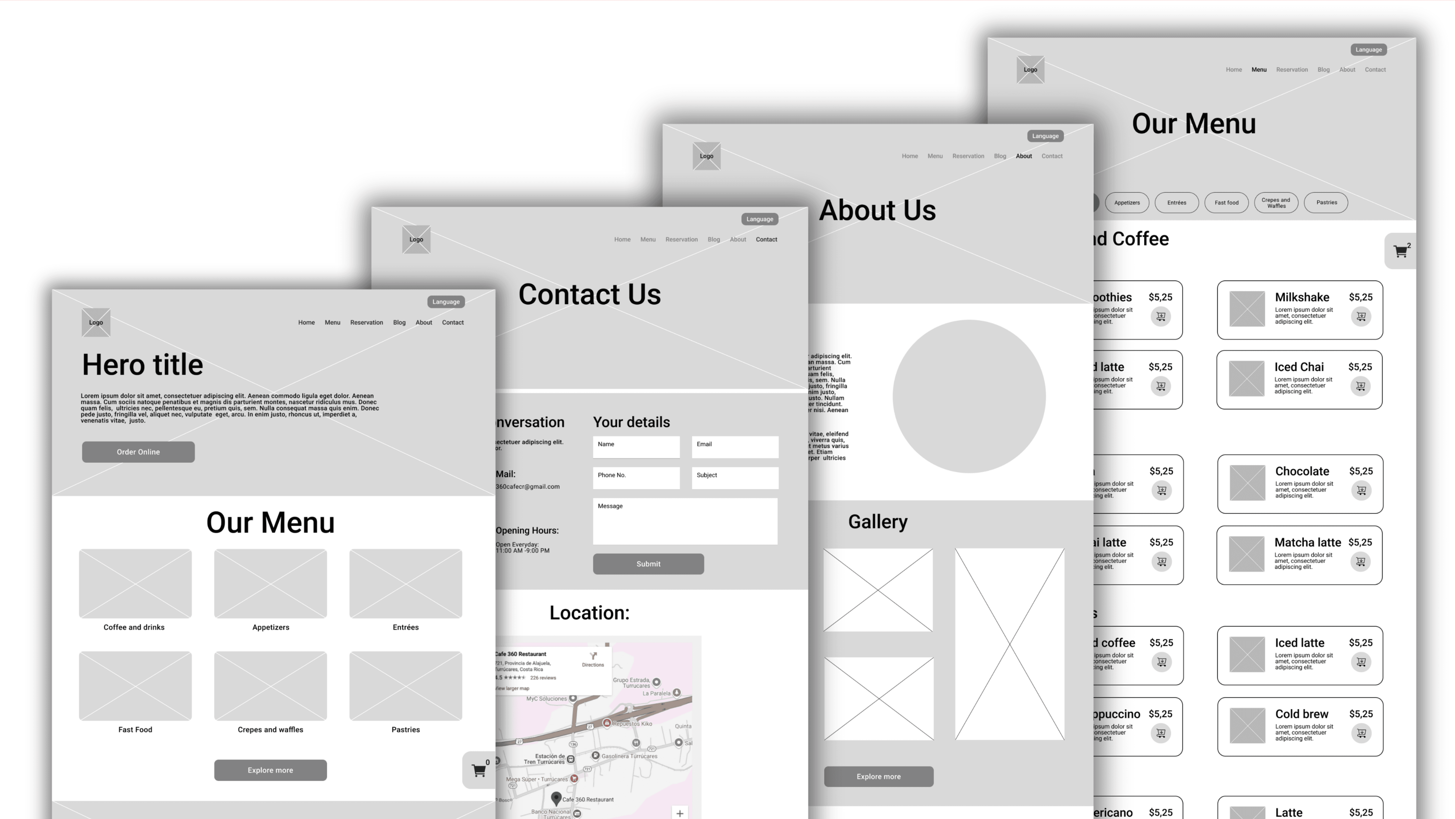
Low-fidelity wireframes translated the architecture into a layout and interaction logic. The wireframing identified and refined key interaction patterns for the ordering process, including product filters, detail pages with customization, cart drawer behavior, and a three-step checkout.
Screens were aligned with persona flows to ground the design in behavior rather than preference. After confirming layouts, attention moved from structure to content.
Content Strategy
After validating the structure, I established the content strategy's messaging, copywriting, and visual design. Some of the elements were created in response to stakeholders' requests.
Please refer to the final report at the end of this case study for more details.
Messaging, tone and Copywriting
The website was designed to foster trust with a friendly, inviting tone that mirrors the café's warm, family-oriented atmosphere. All content, including menu details and page content, was written in both Spanish and English to reach both audiences.
Visual Design
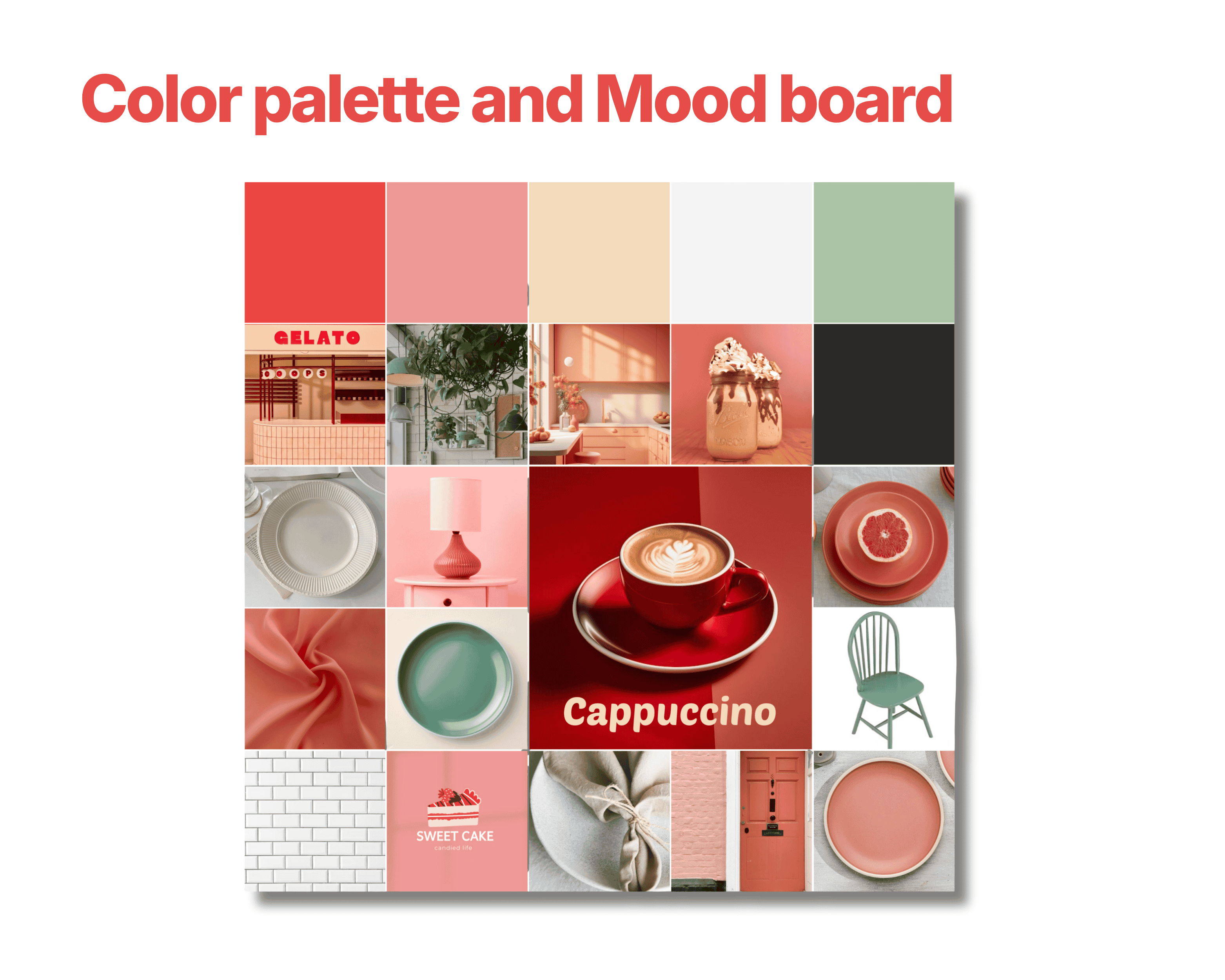
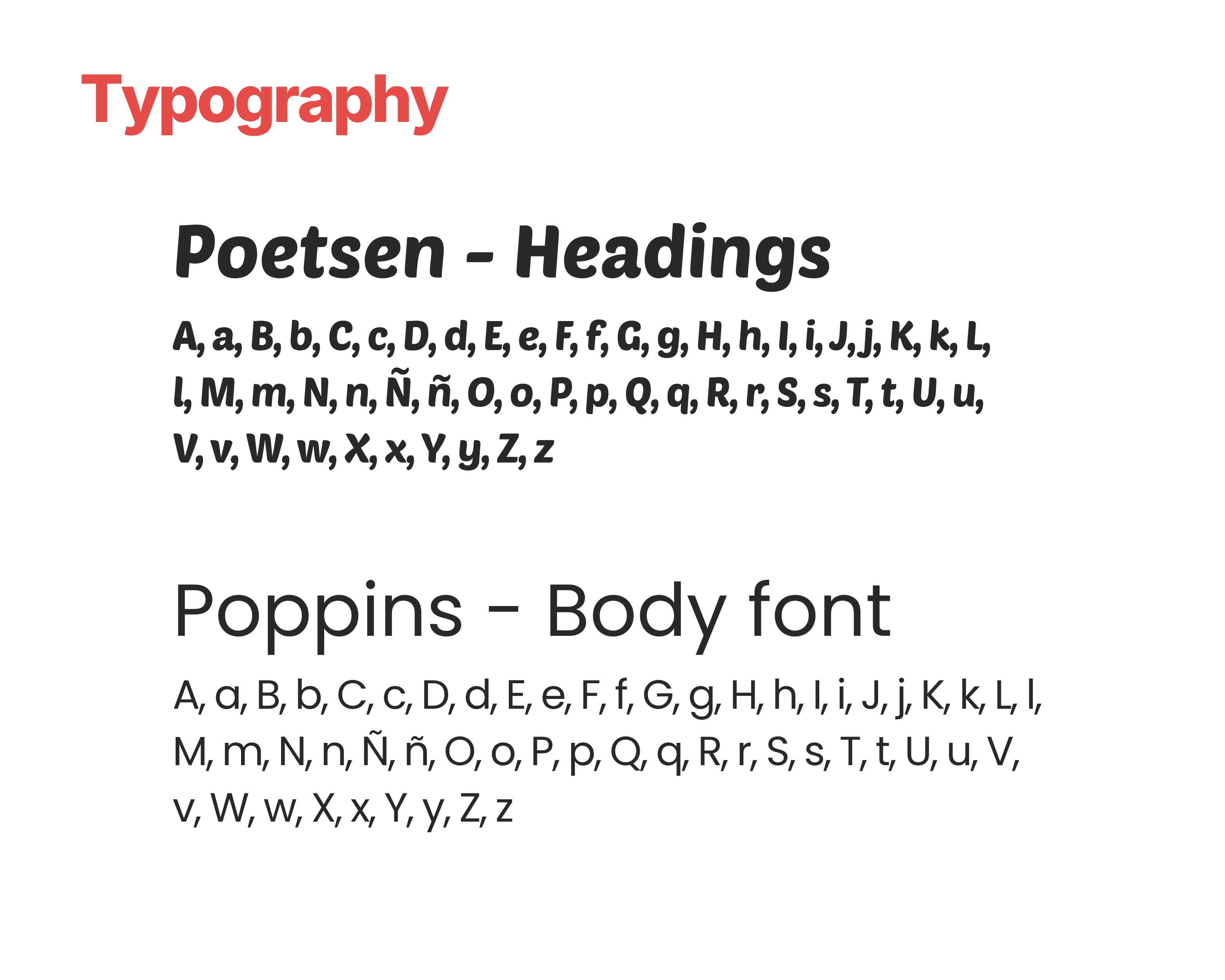
The visual system, including imagery, color palette, and typography, aligns with the content to enhance clarity and engagement.
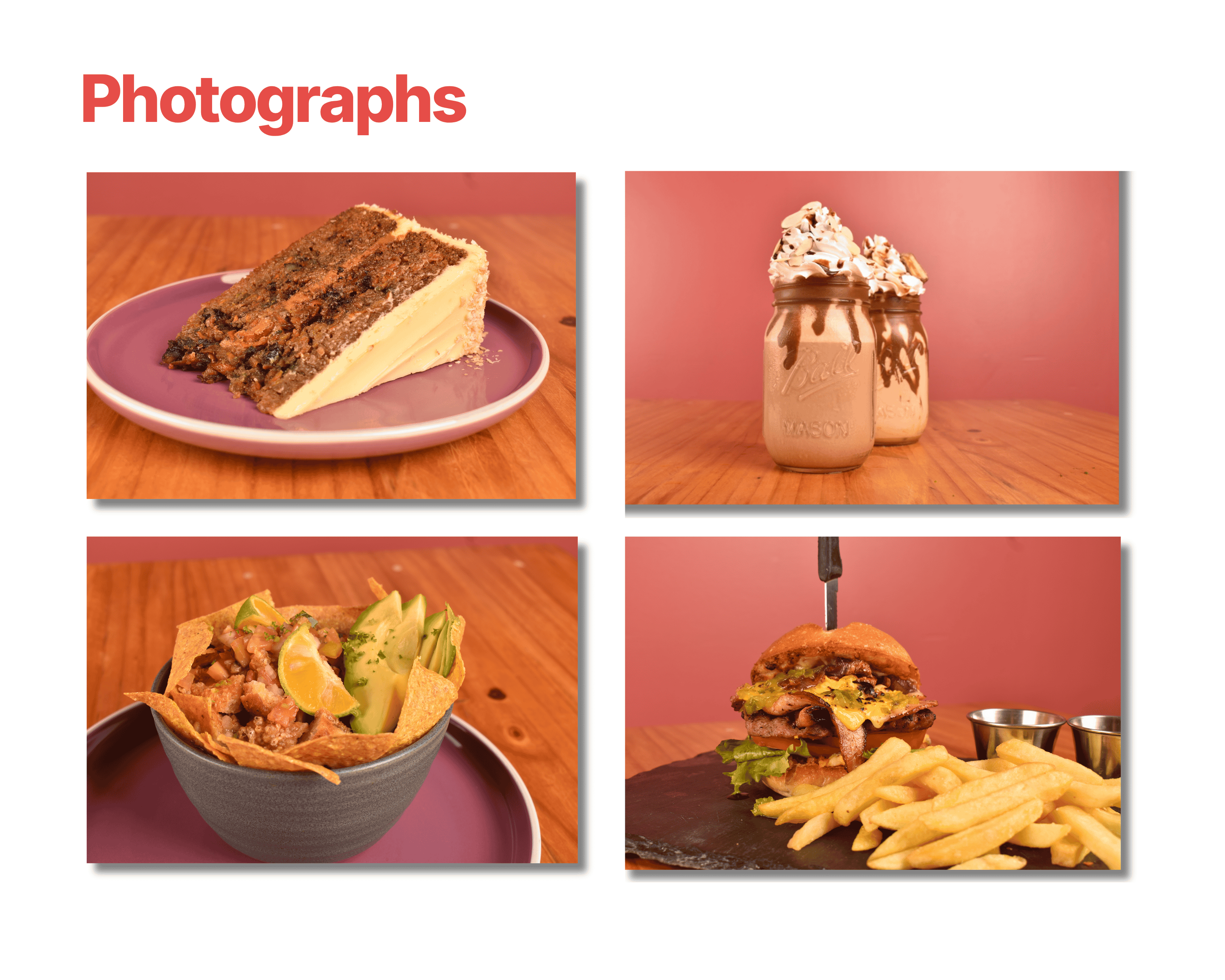
High quality photos → Build Trust and stimulate appetite.
Warm Color palette → Reflects the cafe's atmosphere and guides focus
Poetsen and Poppins typography → Improves readability and aligns with the brand identity.
High- Fidelity Prototype
The high-fidelity prototype combined validated information architecture, wireframes, and content strategy into a comprehensive visual system. Key user flows were prototyped in both languages for bilingual testing prior to actual development. It served as a testable hypothesis grounded in research findings. The only way to confirm its effectiveness was to test it with real users.

Phase 3: Validate & Iterate
Collecting user feedback
During the third phase, the potential solution was tested to determine where it worked—and where it didn’t. These insights helped me identify friction points and make targeted refinements, improving usability and ensuring the design aligned with real user expectations.
Methodology
Conduct usability testing
Gather insights
Translate insights into actionable refinements
Usability testing
Research goals
Assess whether the website's navigation, layout, and overall design are user-friendly and intuitive
Identify needs for improvement based on user feedback.
Research questions
The research questions offer focus and structure to my study.
How efficient is the website for users when managing online ordering, table reservations, and contacting 360 Café?
What can I learn from the user flow and the steps they take on each task?
Which features of the website require modifications?
Methodology and participants
Moderated remote testing
Location: Participants conducted user testing at their own homes.
Two participants were recruited. 1 Male and 1 Female, aged 33 and 43 years old.
One participant is a native Spanish speaker, and the other is a native English speaker. Both are proficient with smartphones and websites.
Prompt tasks
Task 1:
Order a coffee for pickup through the website.
Task 2:
Make a reservation for next weekend for two people.
Task 3:
Contact the cafeteria via WhatsApp.
User testing sessions
User testing 1
Yeilyn, a current 360 Café customer, tested our website and successfully completed all three tasks. During the task: Ordering a coffee for pickup through the website. She said:
“As a regular customer, I would like an account feature that allows me to view my recent orders so I can reorder the same items easily.”
User testing 2
Greg, a future traveler from the USA planning a trip to Costa Rica, tested our website and successfully completed all three tasks. He said:
“Very user-friendly website for making purchases, and it is great that the whole website is available in English.”
Insights
During task one (Order a coffee for pickup through the website) I observed that filling out the checkout form took them more time than expected.
One user suggested, to add an account feature to the website in order to simplify the ordering process for established customers (“I always want the same coffee”).
During user testing, I noticed that users find the order confirmation page unclear and difficult to understand. Improving the visual design may be beneficial as the current layout doesn't provide sufficient clarity
Tasks 2 and 3 (making a reservation for next weekend for two people and contacting the cafeteria via WhatsApp) were completed successfully without any suggestions from users.
Refinements
Each insight was converted into a specific design iteration:
An Account section has been added to the main navigation, enabling users to review their order history, manage saved items, and reorder. This enhancement addressed the gap in the reordering process.
The confirmation page was redesigned to feature a clearer visual hierarchy. It also includes a clearly visible success message and a deliberate completion animation that eliminates any uncertainty.
A small but meaningful improvement to the mobile cart reduced the number of taps needed to review and adjust an order before checkout.

Phase 4: Build & Launch
Developing and launching
The fourth phase focused on developing the website after validation and refinement. During this phase, I finalized product development and handed the product over to the client.
Methodology
Execute website development
Implement search engine optimization
Conduct performance optimization
Complete website handoff
Website Development
Development
The website was built on WordPress.org with the Astra theme. Both were chosen for their performance, e-commerce support, and ability to scale without requiring a developer for everyday tasks.
The website is hosted on Hostinger, a cost-effective option that offers reliable domain hosting with good performance.
Development Stack
The development stack was assembled to meet the functional business and user needs identified in the research phase.
WooCommerce → Suitable for e-commerce and managing orders
TranslatePress Plugin → Enables bilingual content without duplication.
WP Café Plugin → Used for reservations and menu display.
Tilopay Plugin → Used for processing local payments
Mailchimp → Email marketing.
Elementor → Used to design website page layouts.
Search Engine Optimization
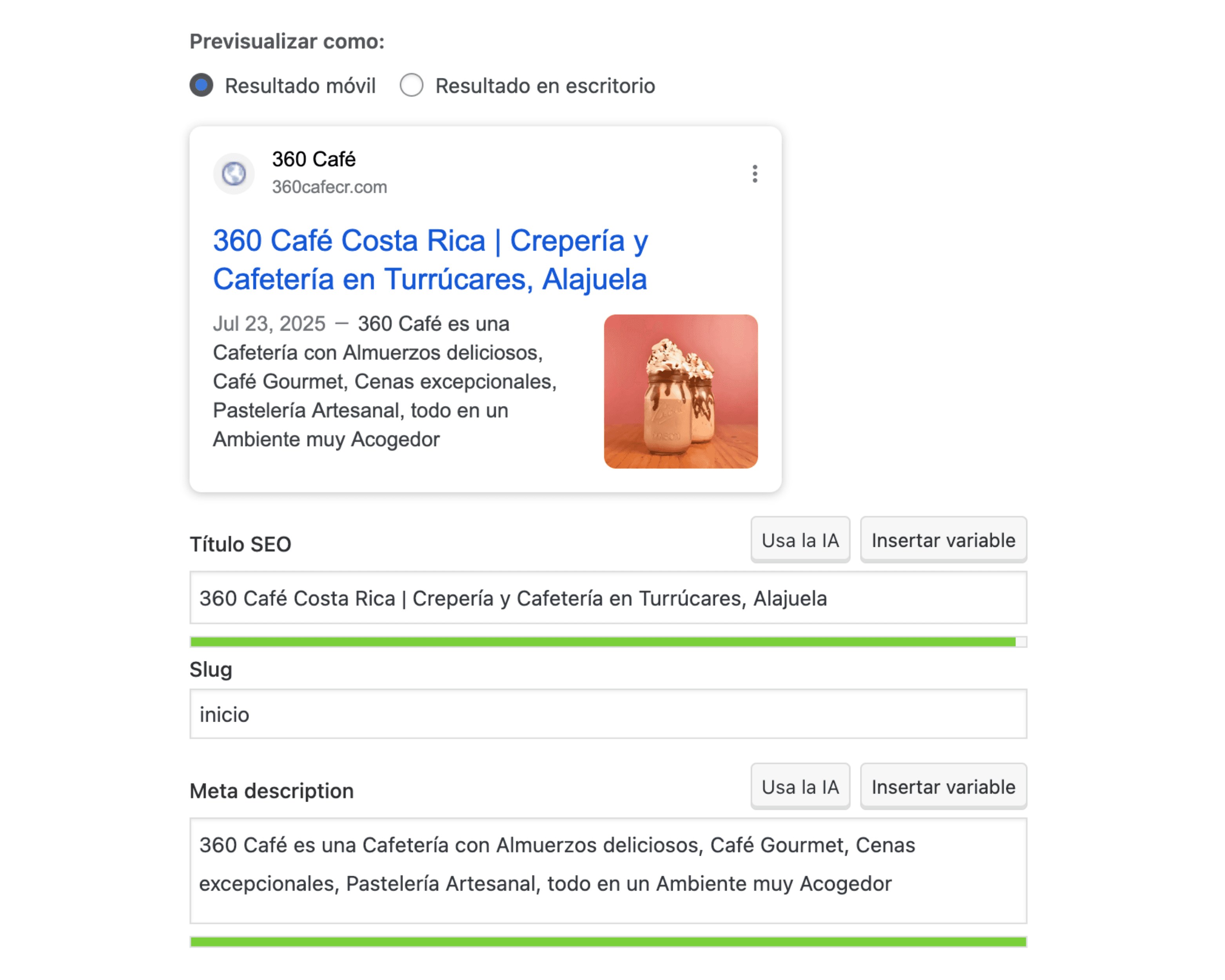
The Yoast SEO Plugin was chosen to enhance the 360 Café website's search engine visibility. Additionally, Google Search Console and Bing Webmaster Tools were used to establish a baseline for post-launch monitoring.
Performance Optimization
All photographs were compressed in Adobe Photoshop. This enabled full optimization before launch, balancing visual quality and website load performance.
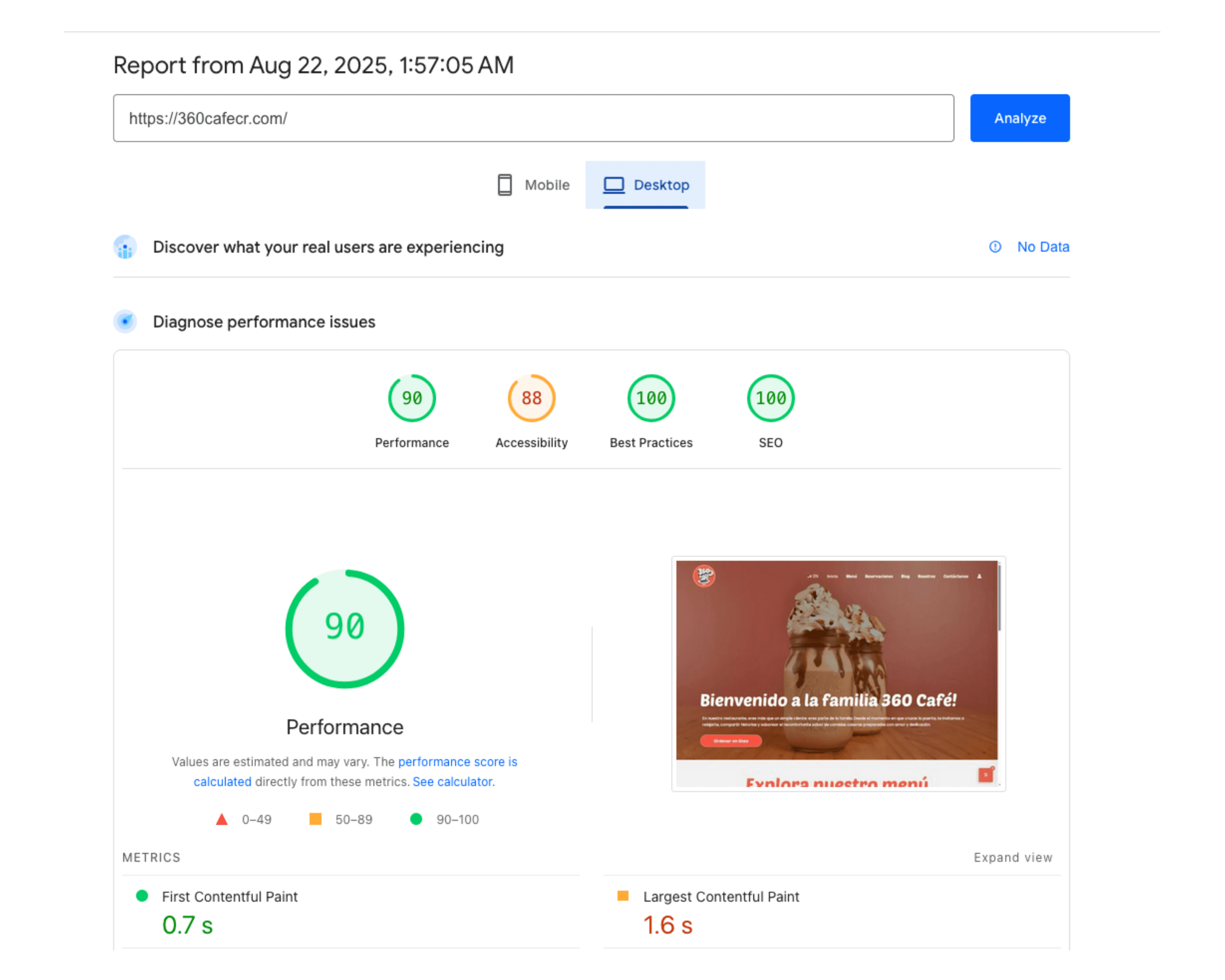
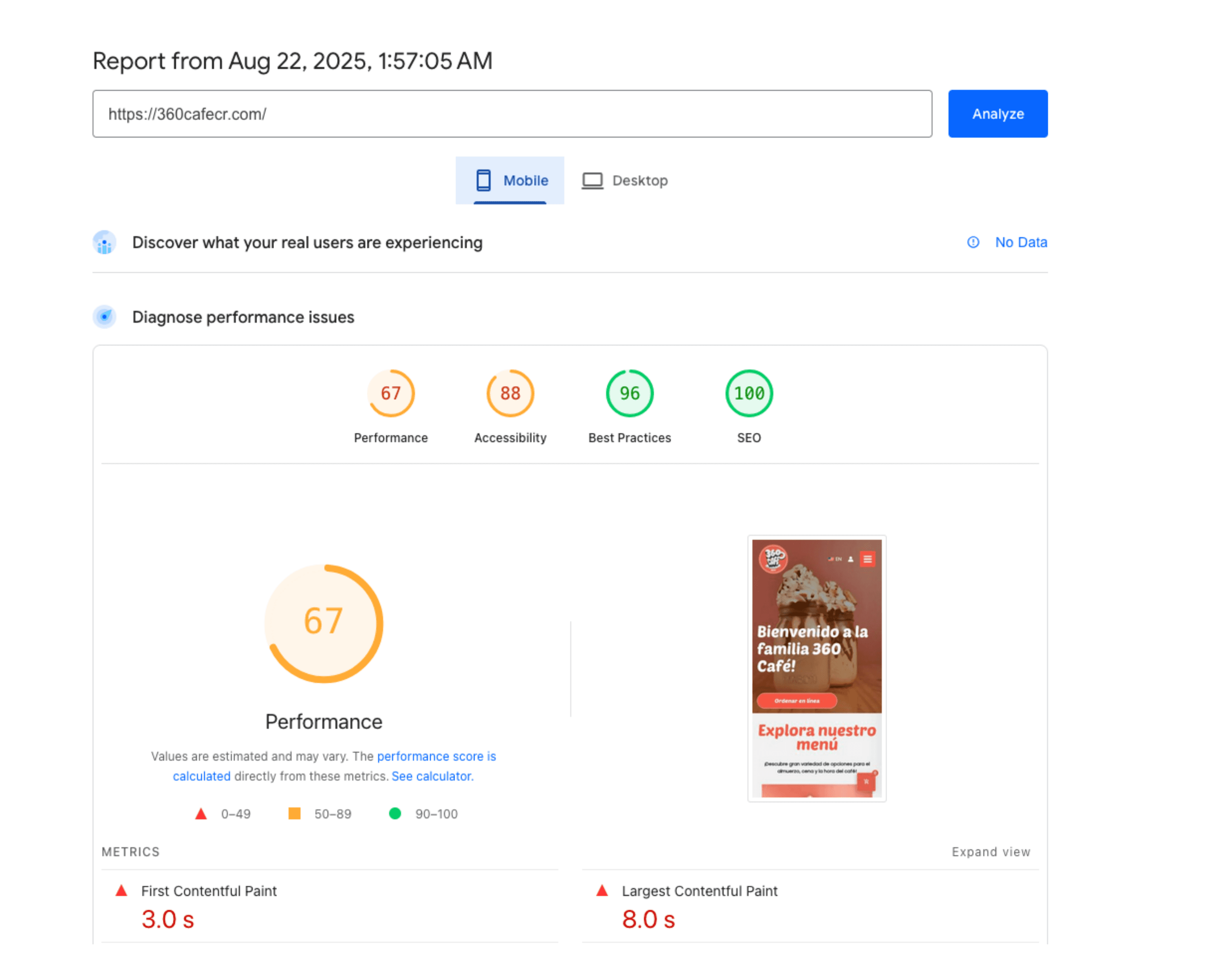
A speed test was run on the PageSpeed Insights website, which provided suggestions to improve load times. Some of these suggestions were implemented, but further analysis was required.
Website handoff
This final stage consolidates all research, design decisions, user testing insights, and development choices from the four stages.
Before launch, the site was tested for its functionalities across devices, browsers, and user paths. The team was trained to manage menus, process orders, and publish content independently
Final deliverables:
Configured Content Management System.
A live e-commerce and reservation system.
A functional payment processing system.
Bilingual interface with full functionality.
Maintenance plan for updates and support
Outcomes and Business Impacts
Eight months after launch, the data clearly shows that the website had become 360 Café's most successful growth channel.
* The data for this analysis were gathered from August 2025 (launch) through April 2026.

Visits since
launch
Indirect growth
on Social media

Users from
United States
Who came, and how
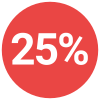
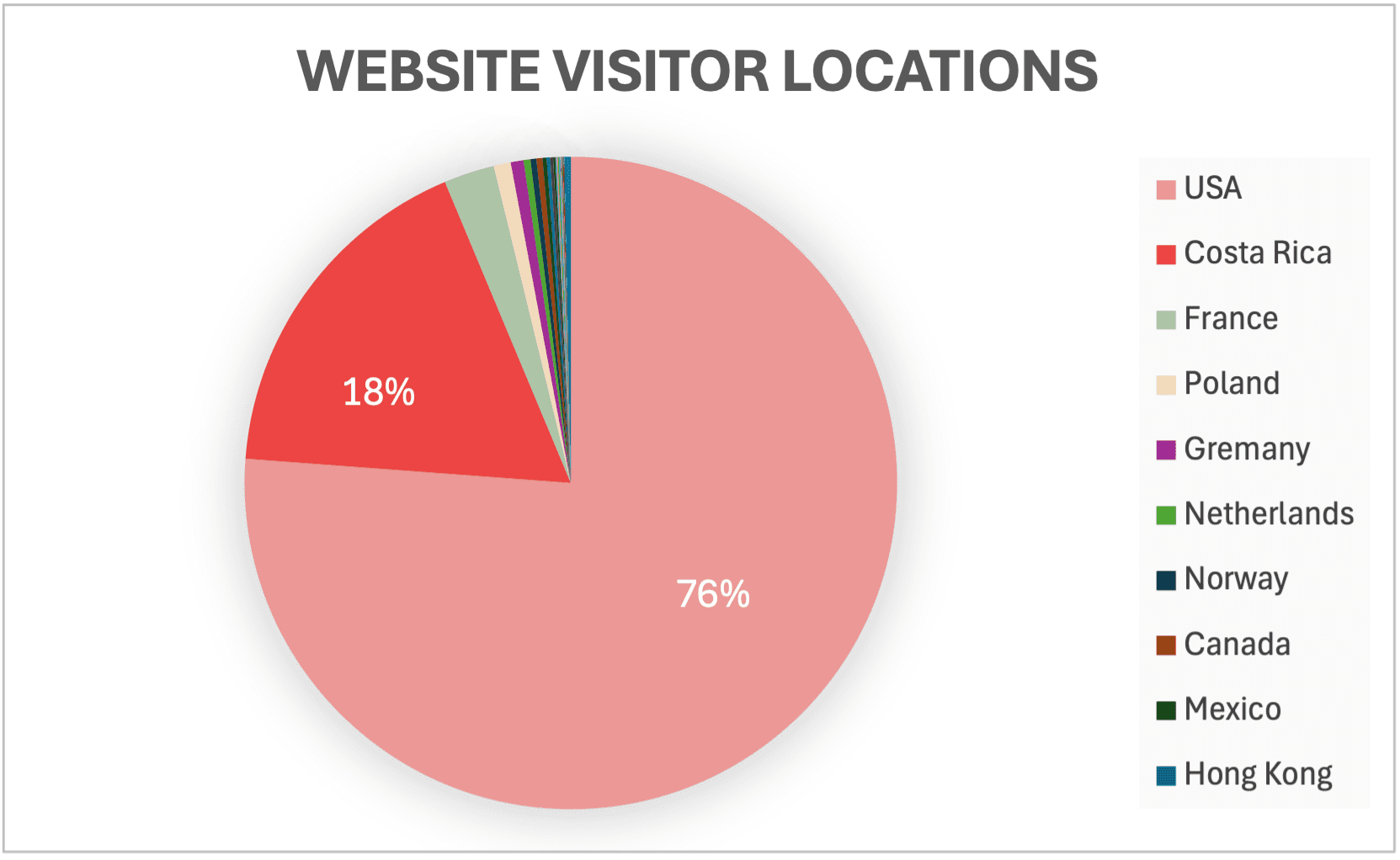
95% of visitors arrived via organic search, confirming that choosing an SEO-focused structure was the right decision. The largest audience segment was from the US (76%), indicating the café's strong appeal to international travelers. Costa Rica users accounted for 18% of traffic, with the remaining visitors from other countries.
What they did once they arrived
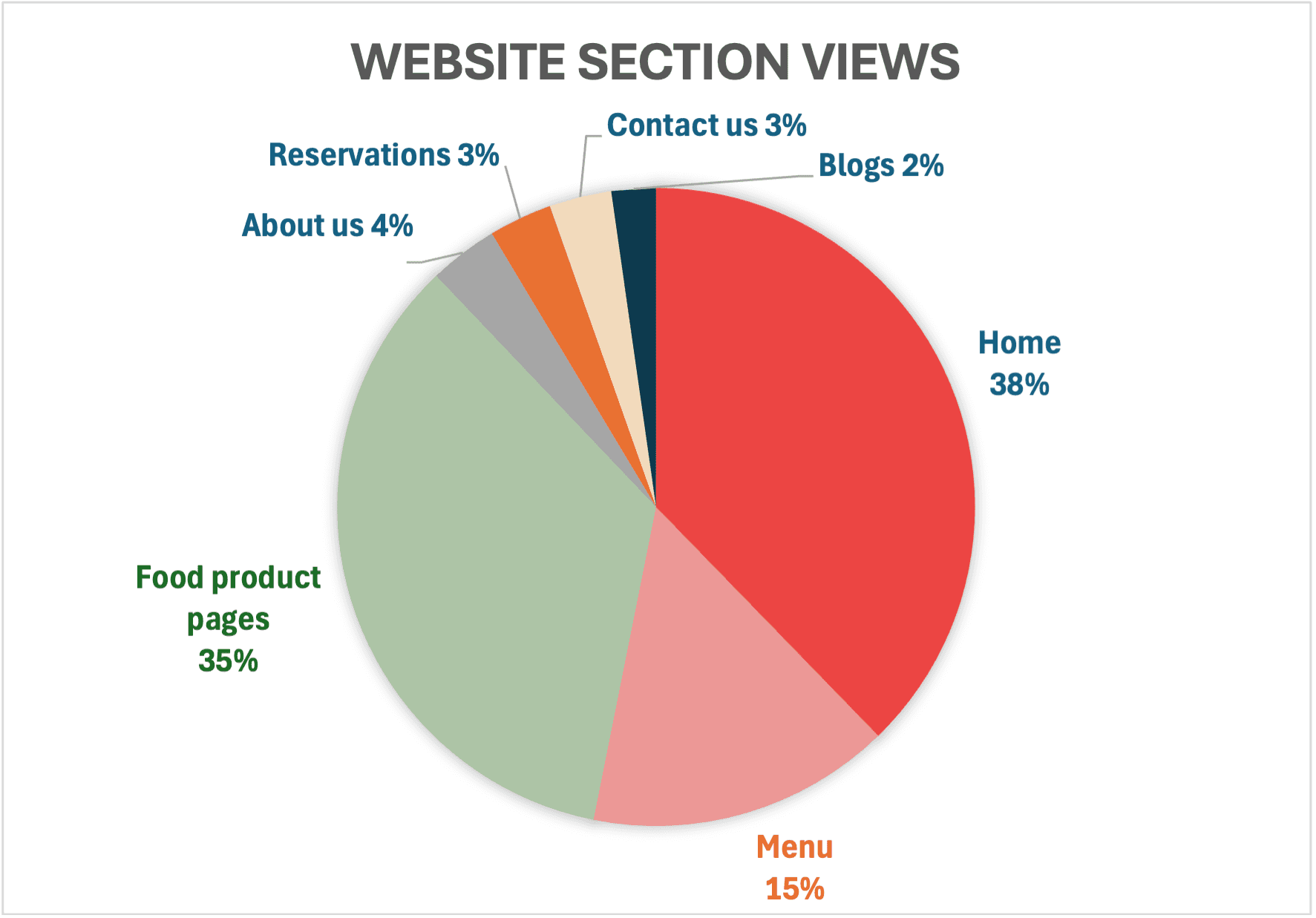
The menu and individual product pages were the most-visited sections after the home page — exactly the behavior the information architecture was designed to encourage. The blog section saw minimal engagement, indicating it does not serve the current audience.
Beyond the screen
The restaurant's social media growth was not a direct aim of the website. However, the number of Facebook and Instagram followers had increased since launch by 28% and 23.5%, respectively. Prior to launch, the annual increase rate was minimal (<1%).
The client reported an increase in reservations and revenues but was reluctant to share exact numbers.
Less than 1% social media followers growth annually before the launch, and up to 28% after.
Conclusion and next steps
What comes after this
Localized marketing campaign targeting the local community to grow the domestic customer segment.
Blog section removal and reallocation of that space toward seasonal menu features or promotions.
Quarterly refresh of menu photography and pricing to keep the site accurate and search-relevant